
PRODUCT DIRECTORY
Fiber Asset Management Systems
1 product
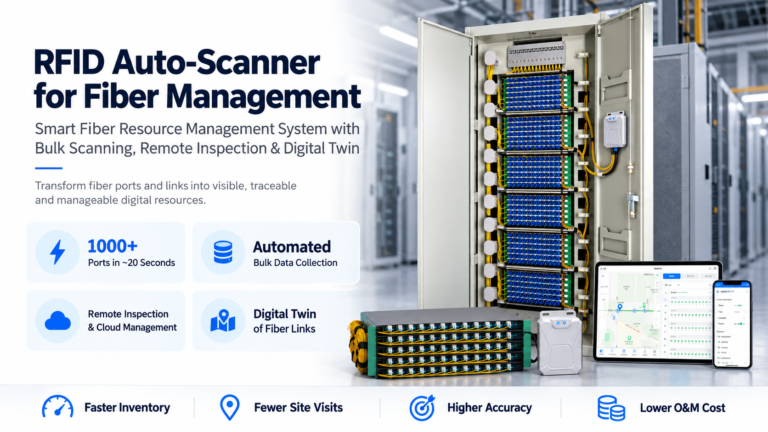
Fiber Asset Management Systems
RFID Fiber Asset Management System
RFID fiber management: deployment questionsThe system combines RFID asset identification, bulk port scanning, remote inspection workflows, and mobile and digital-twin tools. Agree the physical records and field process…
View productRFID identification, bulk port scanning, remote inspection and mobile workflows help maintain passive fiber resource records. Start by defining the ports, assets and field tasks that need reliable digital records.
Compare product configurations
| Product | Published product focus |
|---|---|
| RFID Fiber Asset Management System | A smart fiber resource management system that combines RFID identification, bulk scanning, remote inspection, mobile workflows, and fiber-path visualization. Local inspection uses OTG; remote data uploads use 4G. See inspection and power configuration. |
| Fiber Smart | RFID-based identification, batch collection and centralized management for traceable passive-fiber operations. See full system page. |
| RFID Fiber Asset Management | RFID-based resource visibility for telecom sites, equipment rooms and fiber access nodes. See full system page. |
Product selection questions
What should an RFID fiber asset management system track?
Define the fibers, ports, racks and locations that belong in your resource register. Match physical identifiers to the management records and decide who owns connection and asset changes. The current RFID product combines identification, multi-port scanning and field workflows; confirm the tagging and installation scope for your project.
How should we evaluate scanning and mobile workflows?
Use representative tagged ports and known reference records to test identity collection, record mapping, mobile tasks and handover. Agree the installation conditions and acceptance criteria before procurement rather than assuming a universal scanning range or accuracy.
What information is needed for a fiber management quotation?
Provide asset and port counts, site layout, existing record formats, required inspection tasks and integration boundaries. Separate hardware, software configuration, data migration and training responsibilities in the requested scope.
Project planning and purchasing guides
What a fiber asset management system does
A fiber asset management system keeps an accurate record of passive fiber resources: which fibers and ports exist, how they connect and when they were last checked. The KingNeed system gives fibers and ports a digital identity with RFID tags and links each tag to a resource record. A scanning module identifies multiple tagged ports in one operation instead of checking them one by one, and the results feed inspection records on the management platform. Actual scanning capacity, timing and accuracy depend on equipment configuration and site conditions.
RFID does not keep records correct on its own. The record stays accurate only when technicians verify connections, approve changes and handle exceptions through an agreed process.
Inspection modes and power
The system supports two inspection workflows. For OTG local inspection, the technician on site connects the device directly to a phone using OTG (does not use Bluetooth). For 4G remote upload, the device sends resource data over 4G so teams can review status reports from the management platform without a site visit. Many projects use both: OTG for field work and 4G for routine remote checks. Reporting intervals and connectivity requirements are defined during project configuration.
Power comes from a built-in battery, with the option of external power. Confirm the power arrangement for each site type during planning. Details are in the RFID fiber asset management FAQ.
Where it is used
Typical sites are central offices and ODF rooms, where dense frames make manual labels hard to keep current, and outdoor cross-connect and splitter cabinets, where site visits are costly and remote status reporting helps. For existing frames and cabinets, see retrofitting ODFs and cabinets with RFID. For field cabinets, see RFID for cross-connect and splitter cabinet sites.
Choosing a configuration
Start from the sites, ports and field tasks you need to cover, then pick the models that match. Use the comparison table on this page to see how the models differ. For full component, inspection and power details, see full system page. Confirm component selection and interfaces with KingNeed for your project.
Planning a project
A structured plan reduces rework. Follow these steps in order:
- Specify the project: define sites, ports, records and workflows. See how to specify an RFID fiber asset management project.
- Audit existing records: verify current port and connection data before tagging. Use the baseline audit checklist.
- Run a pilot: test OTG and 4G workflows on one room or cabinet. See planning an inspection pilot.
- Estimate cost: review the project cost factors.
- Evaluate suppliers: use the supplier evaluation checklist.
RFID fiber guides
For full system configuration, OTG and 4G inspection and power options, see the RFID Fiber Asset Management System page. These guides cover planning, deployment and buying questions:
- What Is RFID Fiber Asset Management?
- AIM Patch Panels vs Portable RFID Scanning
- Fiber Records Baseline Audit Before RFID
- RFID Fiber Asset Management FAQ
- Retrofitting ODFs and Cabinets with RFID
- RFID for Outdoor Cross-Connect and Splitter Cabinets
- What Drives the Cost of an RFID Fiber Project?
- How to Evaluate an RFID Fiber Supplier
- Fiber Patch Cord Change Control: Keeping Records Accurate
- Planning an RFID Fiber Port Inspection Pilot
Browse all guides by product line.
Prepare a project quotation
Share your installation country, site layout, required functions, integration scope and purchase quantity. Confirm configuration-dependent options and responsibilities against the selected product specification.